|
|
|
Troubleshooting
The Trasnslate.Net is young tool and have some amout of bugs.
Please don't hesitate and send descriptions of them to translate.net@gmail.com. I will fix them soon as possible.
Below is more information about possible errors and solutions:
- When you run translation first time the "results" window show error about loading System.EnterpriseServices, like:
"Server Error in '/' Application."
Configuration Error
Description: An error occurred during the processing of a configuration file required to
service this request. Please review the specific error details below and modify your
configuration file appropriately.
Parser Error Message:
Could not load file or assembly 'System.EnterpriseServices, Version=2.0.0.0, Culture=neutral,
PublicKeyToken=b03f5f7f11d50a3a' or one of its dependencies. The system cannot find the file specified.
Source Error:
Line 50:<add assembly="System.Xml, Version=2.0.0.0, Culture=neutral, PublicKeyToken=b77a5c561934e089"/>
Line 51:<add assembly="System.Drawing, Version=2.0.0.0, Culture=neutral, PublicKeyToken=b03f5f7f11d50a3a"/>
Line 52:<add assembly="System.EnterpriseServices, Version=2.0.0.0, Culture=neutral,
    PublicKeyToken=b03f5f7f11d50a3a"/>
Line 53:<add assembly="System.Web.Mobile, Version=2.0.0.0, Culture=neutral,
    PublicKeyToken=b03f5f7f11d50a3a"/>
Line 54:<add assembly="*"/> |
Source File:
c:\WINDOWS\Microsoft.NET\Framework\v2.0.50727\Config\web.config
Line: 52
Assembly Load Trace:
The following information can be helpful to determine why the assembly
'System.EnterpriseServices, Version=2.0.0.0, Culture=neutral,
PublicKeyToken=b03f5f7f11d50a3a' could not be loaded.
Unfortunately, I don't sure in nature of this error, but probably here some misconfiguration in .Net
framework (probably this happen when .net 3.0 BETA installed ).
Here possible solutions :
Really editing C:\WINDOWS\Microsoft.NET\Framework\v2.0.50727\Config\web.config is most "dangerous" thing (don't forget to backup it before editing),
but it helped when other options don't help.
Open web.config in notepad or other text editor and remove line 54, i.e.
Line 52:<add assembly="System.EnterpriseServices, Version=2.0.0.0, Culture=neutral,
PublicKeyToken=b03f5f7f11d50a3a"/>
- If results view contained some strings like "Parse error ..." or html symbols like "<span>", "<br>" etc. -
here a errors in parsing. This can happen when site changed design or bugs in tool.
Please copy this string and send for fixing to translate.net@gmail.com with information about
language direction and phrase you use.
- If after some exceptions Translate.Net don't start or start but don't show main window (even after clicking to tray icon)
Probably the config file with settings is broken, to delete config file:
- Stop the tool
- Rename (not copy) file :
"c:\Documents and Settings\{USER NAME}\Application Data\SAU KP\Translate.Net\TranslateOptions.xml"
to
some like "TranslateOptions.xml.back"
- Start the tool
- The tool will start in "clean" state
- If this help - please send to translate.net@gmail.com broken config file, I will check it and try to avoid your problems in future.
- If the unhandled exception window raised, like on screenshot:
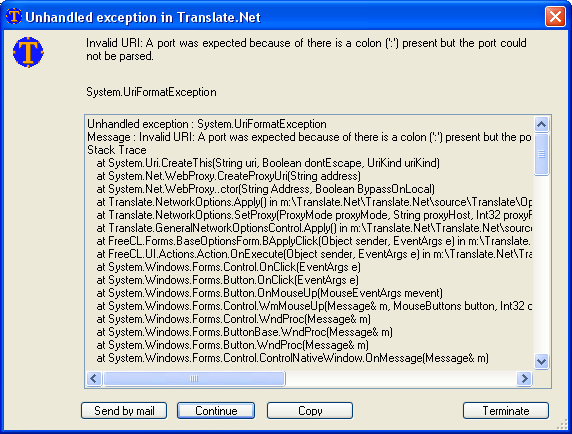
Please do next:
- Click "Send by mail" button, the "New mail message" dialog will be opened with data about exception and with field "To:" set to translate.net@gmail.com
- Please enter detailed information when this exception happen
- Send email
-
- Return to dialog and press "Continue"
- If tool not functional, please restart it
- If tool don't start - reset config file like described above
|
 Translate.Net